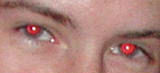
When we take a picture using flash and low aperture time it causes a burst of light that enters the eyes, bounces off from the back of the eye, passes through a layer rich in blood, and then that reflection goes to the camera. Here we have an example of it:
There're many ways to solve this problem. The first and main one would be to avoid the problem in the first place, and to do so you have to correct the aperture time of the camera, so you won't get the said reflection in your pictures. If you can't do that because you don't want to mess with your camera's configuration, there're several software that you can put your hands on to correct the problem, and the one I used was Adobe™ Photoshop® CS5.
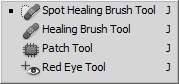
Using that software the steps are amazingly easy:

The result is shown below:
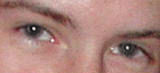
So, problem solved! Maybe in the future I'll explain how to do the same with another software, for now I've to run and finish the rest of the homework, nähdään!